Keep the detail close.
Bring prepared notes, scripts, and useful context into view. Spend your attention on the person in front of you.

Stay in the conversation. Keep your next line close. Bring the people, promises, and details that matter into view.
Memory. Performance. Context. Your choice of control.
Choose what brings you here. Discover what you can do, why it helps, and how to get started.
More than one fits? Switch whenever you like. Every part of the product is yours to explore.
Build a repeatable routine, bring information into view, and choose an outcome without losing the connection with your spectator.
Bring cues, scripts, media, and routines into a deliberate running order—with a way to prepare, inspect, and recover.
Bring relationship context, commitments, tasks, and project plans together so useful details can become work you can follow through on.
Choose readable captions, useful recall, comfortable display settings, and deliberate voice control to support the way you participate.
Follow a conversation. Find your next line. Bring back a useful detail. Choose a moment and see how it unfolds.
Keep spoken words in view while you stay present in the room. Try a short caption exchange, then pause to read.
You start Captions. The sample speaker label appears once for each speaker’s block.
Choose a microphone, speech engine, and language, then start Captions. Accuracy and delay depend on the audio and selected service.
A guided illustration of app behavior with fictional content. AI-generated backgrounds with a single-lens wearer’s viewpoint. Status values and content are samples; display size, position, clarity, and brightness are illustrative. Your fit, lighting, firmware, and settings affect the view in real G2 glasses.
You don’t have to fit one category. Move between the stage, the working day, and home with the same tools.
Rehearse routines and bring the right detail into view.
Find your path ↗02 / PerformanceScripts, show cues, and the confidence of a good rehearsal.
Find your path ↗03 / BusinessRelationship context, commitments, and accountable next steps.
Find your path ↗04 / Everyday supportCaptions, useful recall, and support that works your way.
Find your path ↗The next line, a familiar name, or the cue you cannot afford to miss—right where you can glance at it and stay with the moment.
Bring prepared notes, scripts, and useful context into view. Spend your attention on the person in front of you.
Use your voice or a subtle ring input to move through the content you have set up. Keep your hands free of a separate controller.
A private visual prompt can support a solo presentation or performance without someone feeding lines into an earpiece.
Your paired phone still runs the app. The freedom is from pocket props, crib sheets, and handheld controls during the moment; preparation and rehearsal remain part of the experience.
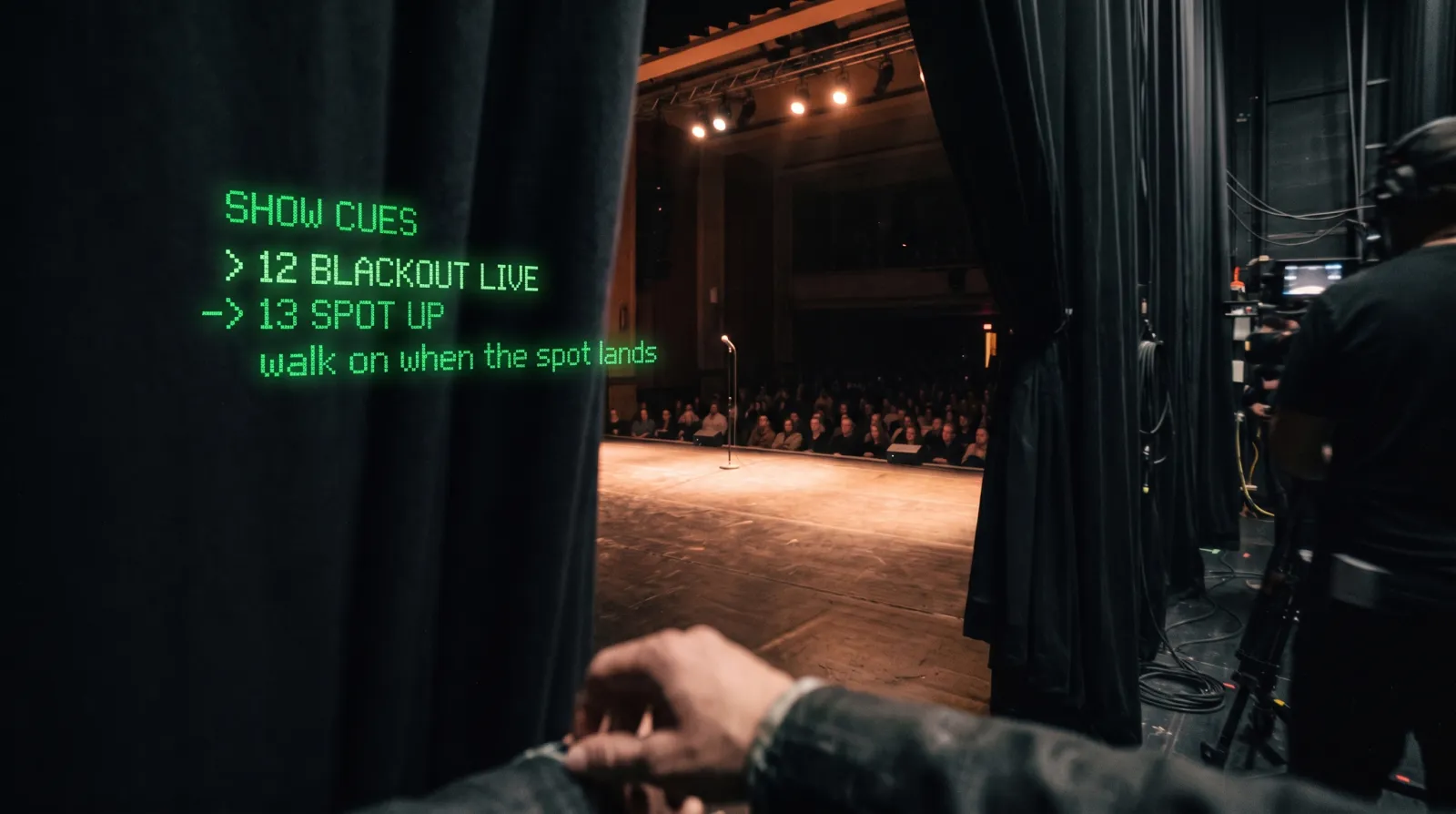
Your slides, script, music, and cues belong to the same performance. Bring them into a running order and control the next moment with a configured voice command or ring input.
The G2 + R1 hardware system includes the Even Realities R1 control ring: a discreet way to navigate SybilSight without reaching for your phone.
Keep a line moving during a talk. Read at your own pace. Bring a cue into view when you need it, then return your attention to the room.
Choose software access for your own compatible hardware, or configure the complete SybilSight + G2 + R1 bundle on our purchase page.
Set up your ring ↗
Choose what each input does in your SybilSight setup. These are example mappings, ready to adapt to the way you work.
Advance a slide, confirm a selection, or move to the next beat.
Show or dismiss the content when you need your attention elsewhere.
Scroll a script, browse prompts, or move through a list of cues.
Move between your configured tools, peeks, or show controls.
Available actions depend on your active app, device, and input mapping. Rehearse the controls with your actual glasses and ring.
Explore input mapping ↗Choose when and how to listen. Build useful context from the conversations you record and retain.
Revisit a name, a promise, or an earlier exchange. Inspect the source and correct details that don’t fit.
Review tasks, reminders, and project context. Keep suggestions distinct from actions you actually complete.
Explore a screen. Try an example. Follow a short path all the way to a useful outcome.
The learning center covers setup, memory, relationships, performance, projects, and the tools in between.
Open the learning center ↗Set up your devices, choose how to listen, and bring one useful detail into view.
Start this path ↗Move from a recording to searchable context and a next step.
Start this path ↗Build a routine, understand its trigger, and rehearse before performing.
Start this path ↗Choose supported on-device processing, review permissions, and understand the services you connect.
Optional external providers and integrations have their own data boundaries. Account and submitted support information are handled separately from your personal memory content.
Yes. The web examples explain the workflow with fictional content. Real features depend on your device, edition, and setup.
No. Supported local processing can run on your devices, while setup downloads, account services, and optional connected features may require a network.
Listening, recognition, a suggestion, and an executed command are different states. Learn your activation and confirmation settings before using a workflow.
Open your account to see the app access and download options associated with your entitlement.
Go to your account ↗Hardware engineering, software, and real performance experience—brought together in SybilSight.
Principal developer at Hak5, with work spanning red-team security tools, the original Xbox Kinect, law-enforcement intelligence systems, and voice-isolation technology. His work is represented in the International Spy Museum.
Kalani brings that hardware and software experience to SybilSight’s architecture and day-to-day development.

A working mentalist with a counterintelligence certification recognized by the U.S. Department of Defense, and a trainer for former FBI agent Joe Navarro’s Body Language Academy.
Chris brings elicitation, observation, and real performance experience to SybilSight’s routines, testing the work in front of live audiences.

A former QA engineer at Meta’s Reality Labs, where he tested prototype VR headsets, and an Offensive Security Certified Professional (OSCP). He is also a working mentalist.
Rado combines hardware testing, security experience, and a performer’s perspective to find what needs to work better before a room is watching.
Experience across consumer hardware, law enforcement, aviation, security research, and national defense. These names describe the team’s prior work; no organizational endorsement of SybilSight is implied.
A system should come with people who help you use it. Get setup guidance, integration support, and ongoing help from the SybilSight team as you make it part of your work, performance, or everyday life.
Start with one useful workflow. Get help pairing devices, choosing controls, and making that first routine or everyday task your own.
Your software grows as we release capabilities, improvements, and integrations. Keep discovering what your system can do.
Connect with other SybilSight users to share setups, techniques, and practical experience. Performers can go deeper into routines with the performer community.